The full & latest version of this code is available here. The unit tests are also there. Or test, I think I only wrote one.
This is a kind of quick one... I didn't look but am completely positive there are libraries and/or perfectly good examples for converting Markdown to HTML in Java. It's also very easy to code and I am particular about how I want the resulting HTML formatted. That makes it something I'd rather write than use.
This all comes down to how I draft articles for this site. I start in Google Docs because it works on all my devices and has spellcheck. Here's an example document that I'm using to test this code:
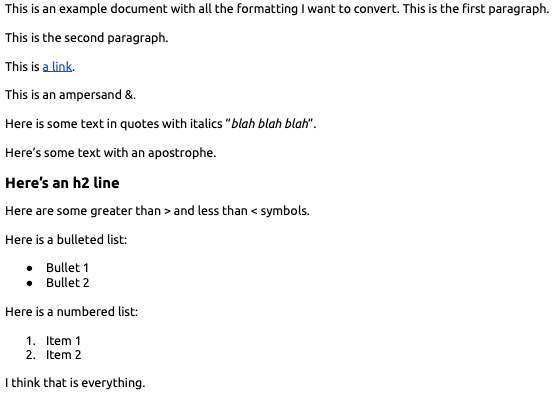
Clicking the little Gemini icon in Google Docs doesn't help here. I tried a variety of prompts to have it export this document into the exact HTML format I wanted and the results were horrible. You should try it sometime if you enjoy frustration.
So instead, I'm saving it as a Markdown file. In that format it looks like:
This is an example document with all the formatting I want to convert. This is the first paragraph.

This is the second paragraph.

This is [a link](https://huguesjohnson.com/).

This is an ampersand &.

Here is some text in quotes with italics “*blah blah blah*”.

Here’s some text with an apostrophe.

## **Here’s an h2 line**

Here are some greater than \> and less than \< symbols.

Here is a bulleted list:

* Bullet 1
* Bullet 2

Here is a numbered list:

1. Item 1
2. Item 2

I think that is everything.
When I later tried this code with a larger, more complicated, document I found inconsistent behavior in how Google Docs exports to Markdown. There will be code to handle this.
Let's start with the easy stuff, the method signature and basic validation:
public static String convert(String md){
	if((md==null)||(md.length()<1)){return("");}
	String html=new String(md);
Next is simple escaping:
html=html.replace("\\&","&");//deal with inconsistent export behavior
html=html.replace("&","&");//first for obvious reasons
html=html.replace("\\>",">");
html=html.replace("\\<","<");
html=html.replace("“",""");
html=html.replace("”",""");
html=html.replace("\"",""");
None of this is super-efficient but I'm not concerned about memory or performance. If this was being used in bulk I would care. This gets less-efficient later.
Now we're going to fix some characters, this is a mix of changing characters to match my preferences and address inconsistent export behavior:
	html=html.replace("’","'");
	html=html.replace("‘","'");
	html=html.replace("\\-","-");
	html=html.replace("\\.",".");
	html=html.replace("\\$","$");
	html=html.replace("\\=","=");
	html=html.replace("…","...");
Now to deal with the *s. The <li> tag thing here will make sense a little tiny bit later:
html=html.replace("## **","<h2>");
html=html.replace("**","</h2>");
html=html.replace("* ","<li>");
html=html.replace(""*",""<i>");//specific to how I format things, not very reusable to others
html=html.replace("*"","</i>"");//same
Now convert links via a regular expression. This will break if something isn't formatted as expected.
html=html.replaceAll("\\[([^\\]]+)\\]\\((https?://[^\\)]+)\\)","<a href=\"$2\">$1</a>");
Now for the more-inefficient part I teased earlier. This is now going over the file line-by-line to (a) wrap regular paragraphs in <p> (b) deal with bullet lists (c) deal with numbered lists. I don't actually use numbered lists much in articles though.
	String lf=System.lineSeparator();
	String[] lines=html.split(lf);
	StringBuilder sb=new StringBuilder();
	for(int lineNumber=0;lineNumber<lines.length;lineNumber++){
		String line=lines[lineNumber];
		if(line.length()>0){
			if(line.startsWith("<h2>")){
				sb.append(lines[lineNumber]);//no changes to h2 lines
			}else{
				//start of bullet list?
				if(line.startsWith("<li>")){
					sb.append("<ul>");
					sb.append(lf);
					sb.append(line);
					sb.append("</li>");
					sb.append(lf);
					//work to end of list
					while(lines[lineNumber+1].startsWith("<li>")){
						lineNumber++;
						line=lines[lineNumber];
						sb.append(line);
						sb.append("</li>");
						sb.append(lf);
					}
					sb.append("</ul>");
				}else if(line.matches("\\d+\\..*")){//check for ordered list
					sb.append("<ol>");
					sb.append(lf);
					sb.append("<li>");
					int indexOf=line.indexOf(". ");
					sb.append(line.substring(indexOf+2));
					sb.append("</li>");
					sb.append(lf);
					//work to end of list
					while(lines[lineNumber+1].matches("\\d+\\..*")){
						lineNumber++;
						line=lines[lineNumber];
						sb.append("<li>");
						indexOf=line.indexOf(". ");
						sb.append(line.substring(indexOf+2));
						sb.append("</li>");
						sb.append(lf);
					}
					sb.append("</ol>");
				}else{
					//regular line
					sb.append("<p>");
					sb.append(lines[lineNumber]);
					sb.append("</p>");
				}
			}
		}
		//line feed after each line
		if(lineNumber<(lines.length-1)){
			sb.append(lf);
		}
	}
That "work to end of list" could be moved to a subroutine and maybe has by now.
This of course all ends with:
return(sb.toString());
Just for fun, I added a little UI to launch this:
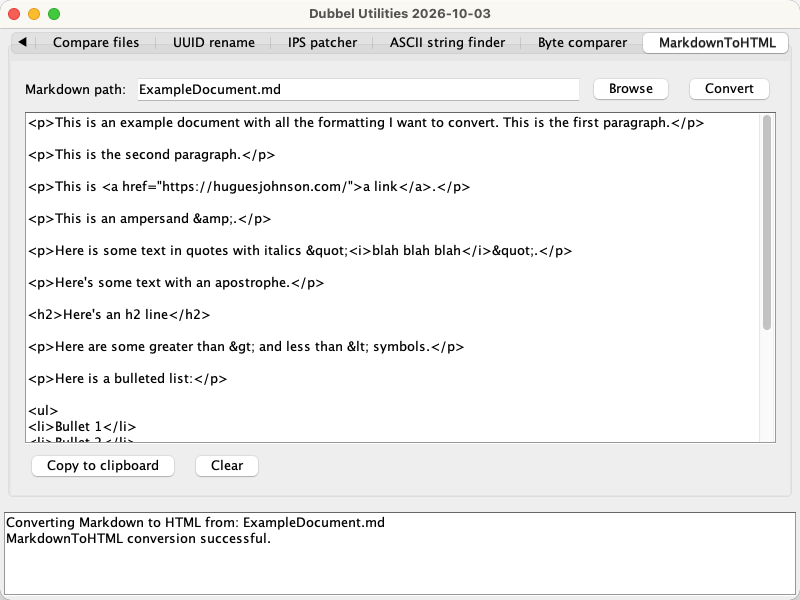
This is in the same repo I linked to above.
Alright, that's all I have this time. Thanks for sticking around to the end.
Tags: Java