About
Like every other program on this site, this is something I wrote for my own use that maybe others will find handy. This time around I set off to solve the problem of having to create, and remember, secure passwords for the myriad of sites I frequent.
Chances are you have logins on a dozen different web sites too. You can't remember a dozen unique passwords so you come up with something along the lines of "IL!keP1e" that meets all the usual requirements - it's 8 characters long and contains all the different character types. You use it on the all web sites you sign up on. Everything is great until one of those sites gets hacked and suddenly these l33t h@x0rz have a username and password they can try everywhere else.
So you protect yourself by changing it up a little. Instead of "IL!keP1e" you use "IL!keP1e-SiteName" It feels like you did something but really you're no better off.
As we've seen all too often in the news, a lot of web sites do a poor job protecting your password. On many sites it's sitting unencrypted in a database or log file just waiting to be stolen.
If a web site has any weird restrictions around legal characters or a short maximum password length, chances are they're storing your password unencrypted. Competent sites store a salted+hashed version of your password which renders these restrictions moot. At the end of the day though, you have no idea how any site is storing your password so the safest course of action is to use a different complex password for each of them.
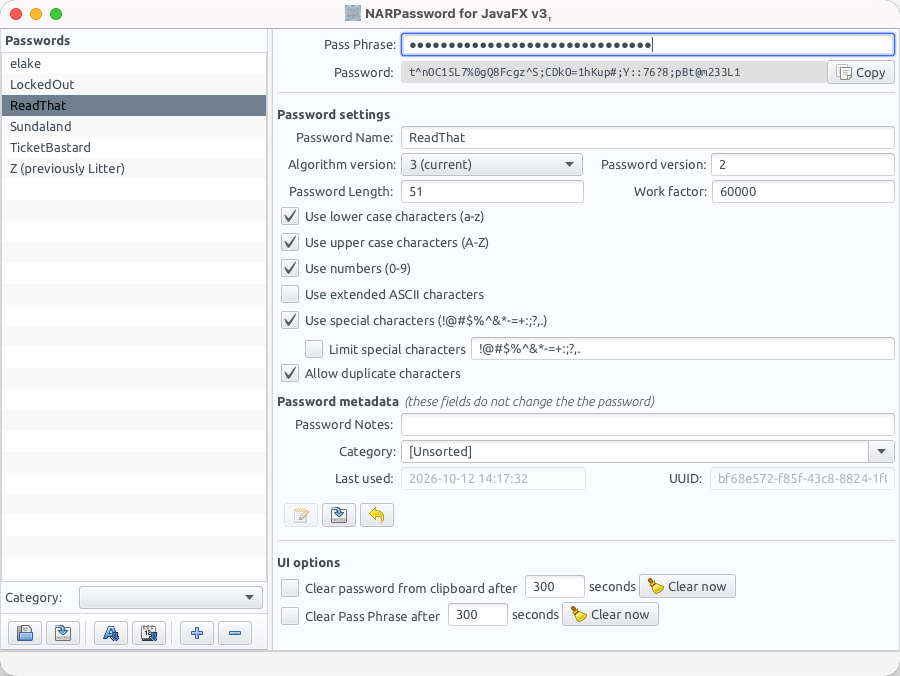
NARPassword is a program to generate a non-random password based on a personal pass phrase, password name, and other settings. Here are some examples of the passwords it produces..
Why am I qualified to write an application like this anyway? I did do a whole bunch of graduate work in computer security and spent a lot of my career fixing inadequate security controls in software. I won't be a blowhard and claim to be an expert but I'm not a complete dunce either. I'm confident enough that this works that I use it for every web site password.
I realize there are dozens of password managers that solve this general problem. Every one I looked at stores your password somewhere. I don't trust any of them to do that securely. Some popular ones have been compromised in the past. So I opted for a solution with no storage required.
Benefits
- Small changes to either the pass phrase, password name, or password settings result in radically different passwords.
- Passwords generated are never stored by NARPassword - neither locally nor "in the cloud".
- If a password is compromised the hacker would not be able to easily reverse-engineer your pass phrase. I say "easily" because someone with enough motivation, computational power, and time could generate a huge table of pass phrases+password names+password settings to brute-force this. The latest version of NARPassword relies on PBKDF2-SHA256 for password generation, with a configurable work factor. Using the default work factor setting (60,000), it still takes hundreds of thousands of years to brute-force a generated password even with an entire data center of GPUs.
- Generated passwords should not be vulnerable to dictionary attacks. I can't say "won't" because I don't have any rules in place to prevent this algorithm from generating words. So if you pick an 8 character password with only uppercase and lowercase letters it's entirely possible, but statistically unlikely, this will generate something like "PasSwORd".
- Multi-platform - identical output for the same pass phrase+password name+password settings regardless of OS.
- 100% free open source - source code is available on GitHub
Algorithm features
The current algorithm version (v3) supports:
- Configurable character sets to include in generated password (uppercase, lowercase, number, special characters)
- Passwords with extended ASCII characters
- Arbitrary password length
- Password versioning - changing the version also modifies the password in a repeatable way
- Configurable work factor (higher number increases complexity and also generation time)
- Limiting special characters to a defined set for sites with dumb rules
JavaFX UI
The user interface includes some possibly helpful features:
- Save/load lists of password settings with encryption
- Sorting and filtering by category
- Password notes field that doesn't change the generated password
Download
Disclaimers
- This application can create a false sense of security. If your name is Joe and your pass phrase is "Joe" it won't be all that difficult for someone to unlock all your passwords. Now if your pass phrase is "Joe likes salami", and you're not named Joe and hate salami, then you're in better shape. Think of your pass phrase as being a "master password", you really don't want to use something that's easy for others to figure out. You of course can use a different pass phrase for each site if you can remember them all.
- Two completely different pass phrase and password name combinations could theoretically produce the same password. This is especially true for short passwords.
- If you forget your pass phrase or any password settings there is no way I know of to recover them.
- Someone determined to hack you specifically will probably not be deterred by long semi-random passwords.
- Please use multi-factor authentication on every site that supports it.
Tags:
Java
JavaFX
Software
Related